

How to use KAVIP coupons?
2025-07-07 14:42:11
Readings:352Times
Hi, KA baby
If you are not yet familiar with how to use coupons
Here's a simple guide on how to do it.
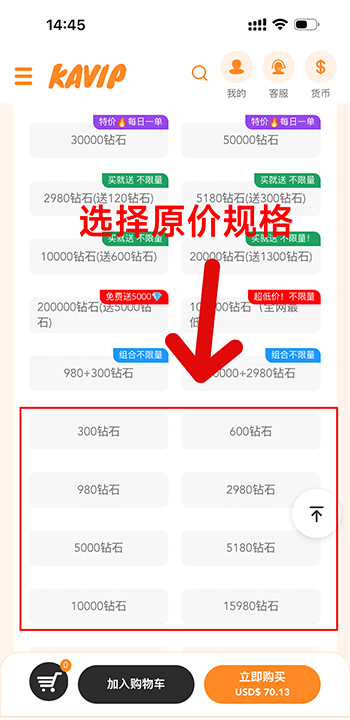
❶ Select the items and add them to your shopping cart, choosing the original price and specifications.
Note: Items with color tags such as "Daily Order", "Buy One Get One Free", or "Special Bundle Price" in the upper right corner are special offer items and cannot be discounted with coupons.
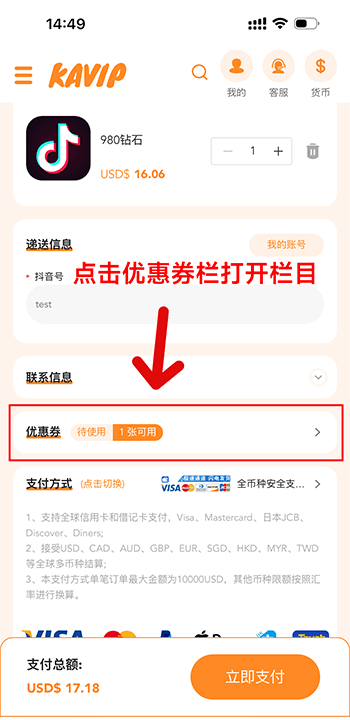
❷ Locate the coupon section in your shopping cart, click on the section to access the coupon usage page.
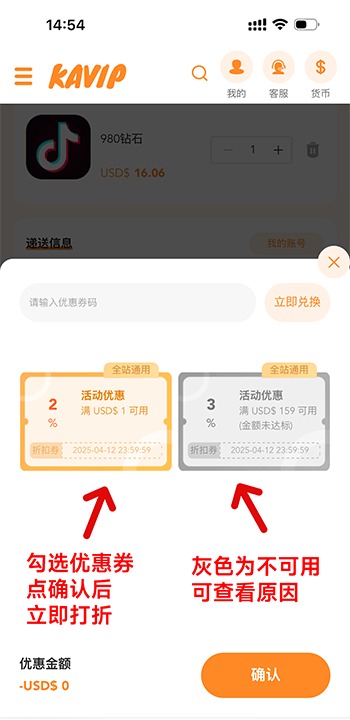
❸ Select an available coupon, or enter the coupon code you obtained in the redemption field and click "Redeem Now" to automatically apply the discount.
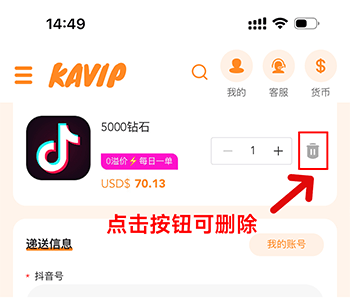
If you find that the selected item cannot be used with the coupon, please delete the existing item in your shopping cart , refresh the page, return to the order page, select the item that can be used with the coupon, and place your order again.
For further questions, please contact our online customer service at the top right corner of the website.