

How to Top Up Kuaishou Coins Overseas (2026): Pay with PayPal & Credit Card via KAVIP
For overseas Chinese and international students in the US, Canada, UK, Australia, Southeast Asia and other regions, when sending gifts or buying live-stream products on Kuaishou, they often cannot pay because they have no WeChat/Alipay balance, or their overseas credit cards are flagged by risk control when linked to mainland apps.
If you want to top up Kuaishou Coins directly with PayPal, credit cards (Visa/Mastercard/AMEX) or local e-wallets, KAVIP Overseas Direct Top-Up Platform provides an official ID direct top-up solution. No account password is required, avoiding high app store markups, with fast arrival.
Why is web direct top-up more cost-effective than in-app purchase for overseas Kuaishou live top-ups?
In-app purchases of Kuaishou Coins on overseas App Store or Google Play incur about a 30% in-app purchase channel fee, and this commission directly raises the effective exchange rate. Through KAVIP web direct top-up, the system automatically converts at real-time international exchange rates and supports settlement directly in local currencies such as USD, CAD, AUD, GBP, EUR, SGD and MYR. The overall cost is far lower than in-app purchases.
| Comparison | App Store / Google Play In-App Purchase | KAVIP Overseas Official Direct Top-Up |
| Price & Exchange Rate | Expensive (includes about 30% platform channel fee) | Cost-effective (many coupons) |
| Payment Methods | Limited to overseas store accounts with foreign cards linked | PayPal, foreign currency credit cards, local wallets in multiple countries |
| Restrictions | Accounts in some overseas regions may show purchase restrictions | Works globally; direct top-up with Kuaishou ID only |

KAVIP 4-Step Guide to Top Up Kuaishou Coins
On the KAVIP platform, topping up Kuaishou Coins requires no Kuaishou account login and no password:
1. Copy your "Kuaishou ID": Open the Kuaishou app, tap the [three-line] menu at the top left to enter your profile, and copy the numeric or alphanumeric "Kuaishou ID" below your avatar (do not enter your nickname).
2. Select amount and currency: Go to the KAVIP Kuaishou Coins top-up page and select the corresponding amount (supports small trial amounts up to fast arrival for large Kuaishou Coin orders from 300 to 100K and multiple options). In the upper right corner, you can freely switch settlement currencies such as USD, CAD and AUD.
3. Enter ID and choose payment method: Paste the Kuaishou ID, verify it is correct, and choose your preferred payment channel:
● PayPal payment: Supports one-click quick payment with global PayPal accounts.
● International credit cards: Supports multi-currency debit/credit cards such as Visa, Mastercard, American Express (AMEX), JCB.
● Local e-wallets: Supports direct payment via local wallets such as Taiwan convenience store payment, LinePay, JKO Pay, telecom payment, Malaysia TNG, Grabpay, Singapore PayNow, Philippines GCash, etc.
4. Fast arrival after payment: After successful payment, the system processes automatically. In about 5 minutes, open the Kuaishou app, go to [My Wallet] and refresh to check.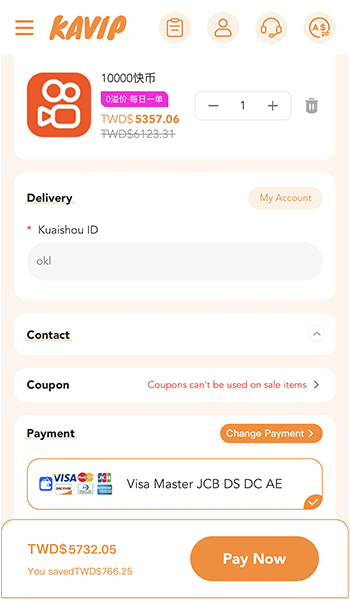
Frequently Asked Questions (FAQ)
1. Is it safe to top up Kuaishou Coins with overseas PayPal or a USD credit card?
Completely safe. All Kuaishou Coins on KAVIP are directly topped up through legitimate official commercial channels. The source of funds is compliant, and we never ask for your account password, so no remote-login risk control or account ban risk will be triggered.
2. Are Kuaishou Coins on international Kwai and mainland Kuaishou interchangeable?
Not interchangeable. International Kwai and mainland Kuaishou have independent account systems, and Kuaishou Coins cannot be transferred across regions. Please confirm you are using the mainland Kuaishou app before placing an order.
3. What if I entered the wrong Kuaishou ID?
Virtual goods cannot be canceled once the top-up is successfully completed for the entered ID, so please verify the number carefully before payment. If you find it is wrong and the order has not yet been fulfilled, please contact KAVIP 24/7 online customer service immediately for assistance with interception.